
A Guide to AI Usage Control
AI Usage Control finds the third-party AI your people use and enforces security policy on how they use it. How Gartner® defines the category, what strong AI Usage Control looks like, and where Aurascape fits.
Mark McLaughlin, Product Marketing Manager | Aurascape
September 21st, 2026 | 🕐 8 minute read
Introduction
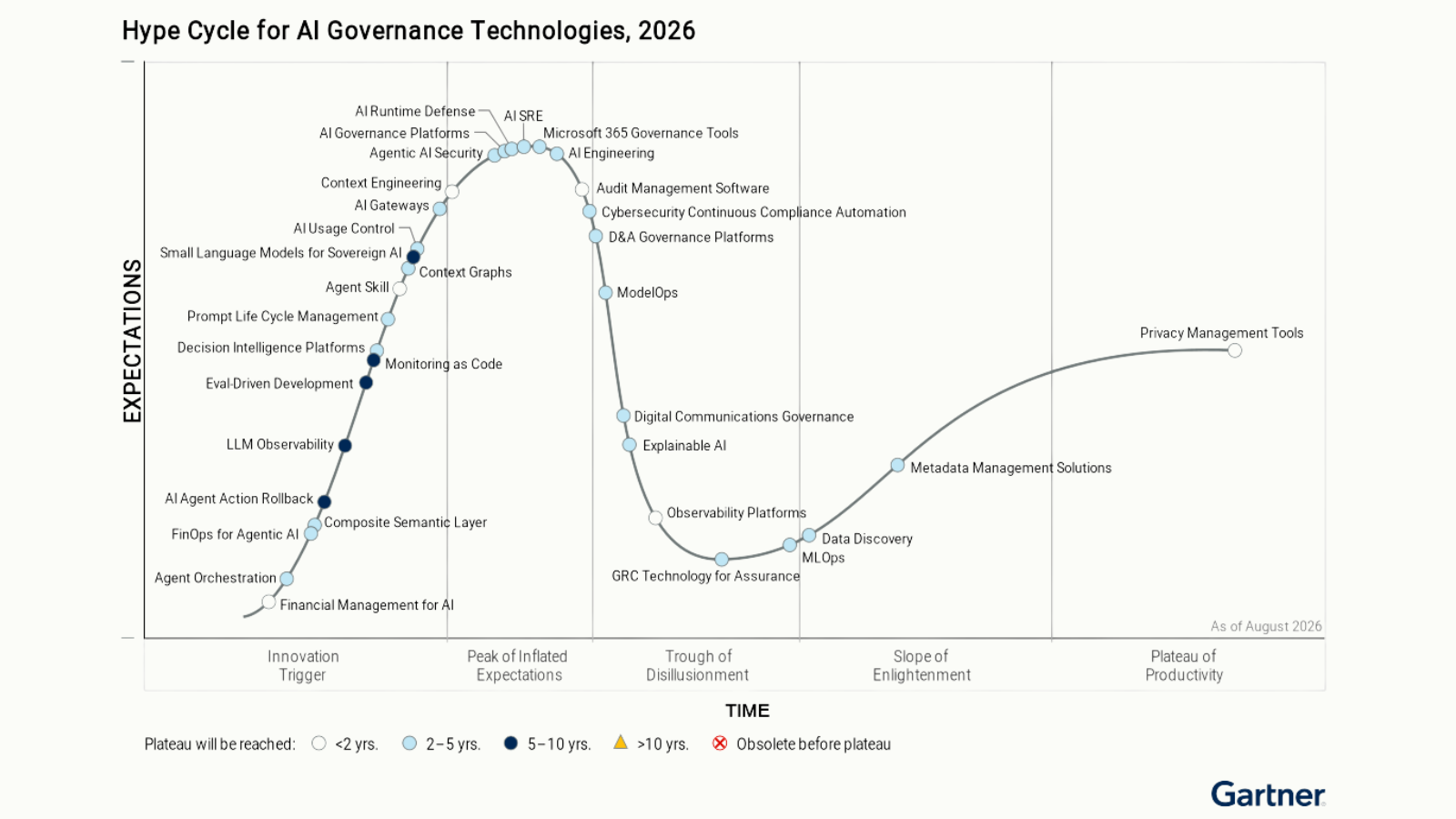
AI Usage Control is the security category for finding the third-party AI your people use and enforcing security policy on how they use it. It covers the AI they use in a browser, the copilots running in SaaS platforms, the AI embedded in apps or websites, the coding assistants in their editors, and the agents they run on their laptops. Gartner® defines the category in its Hype Cycle® for AI Governance Technologies, 2026: “AI usage control (AI-UC) is a technology to discover the use of third-party AI and enforce the security policies of an organization.“
At a high level, Aurascape believes there are five vital jobs for proper AI Usage Control:
- Find the AI your people use, sanctioned or not.
- Analyze and score the risk of each tool.
- Enforce policy on what happens inside AI interactions, not just on the destination.
- Enforce that policy in real time, without hurting end-user experience.
- Keep the evidence to help security, IT, and compliance teams demonstrate AI governance.
This blog will go through each of these in detail. But first, why is AI traffic different enough to warrant a new category to control it?
Why the AI Usage Control category exists now
New AI applications release daily, and each one is another destination for a catalog of app IDs and URL categories to learn. Most traditional security tools recognize an application only after someone has classified it, so the newest tools, the ones nobody has vetted yet, are the ones a destination list is most likely to miss. The Gartner® report explains: “The speed of AI adoption often outpaces an organization’s ability to monitor, govern and control usage, increasing the risk of data leakage.“
What’s more, is AI is no longer just found in websites. People use AI via a desktop app, a coding assistant in the code editor and on the command line, a feature embedded in the SaaS you already license, and an agent running on a laptop and calling model APIs directly. Tools built for the web path typically see one or two of those surfaces. John Watts, VP Analyst at Gartner® and author of the AI Usage Control section of the Hype Cycle, puts the gap this way: “Existing security controls typically focus on discovery for only one or two vectors of AI usage: web, API, applications or source code. Many current discovery tools treat AI applications as any other application, ignoring unique risks and integrations of AI in an organization’s environment.“
Finally, look inside the traffic. For most of the web era, a security decision hinged on destinations, identities, and data patterns. Was the URL allowed, was the user entitled, did the upload match a pattern. Traditional security tools are good at those decisions. But AI broke the assumption underneath them: that the destination tells you what is happening. One allowed destination can now hold many different interactions: a harmless summary, a paste of customer records, a request to write code, or an agent acting on a connected system.
CASB solved a version of this for SaaS. It could tell which cloud application a person was in and apply a policy per app, and the actions inside a SaaS app were nowhere near as varied or complex as the ones inside an AI app. One AI app holds dozens of Intentions, from summarizing a document to running an agent, and the risk changes with each one. Traditional pattern-matching sees one prompt, without the context of the conversation around it. Threats arrive inside the traffic too, such as an instruction hidden in a document the model reads or malware in a file returned as a response to the user. A destination check does not look inside. And because much of AI traffic runs over WebSockets, QUIC, and Protobuf, traditional security tools struggle to inspect the traffic for data leakage or threats.
Traditional security tools decide whether a person may reach an AI application and whether an upload matches a pattern. AI Usage Control gives admins more fine-tuned policy to decide what may happen once the person interacts with the AI: which account, which mode, which model, what data, what tool an agent may call, and what gets kept as evidence.
AI introduced a new layer, the interaction itself, and traditional tools were not built to read it.
What strong AI Usage Control looks like
Discover the AI in use, wherever it shows up: Browser traffic is the easy part. Discovery also has to reach desktop apps, coding assistants in the code editor and on the command line, and the AI features embedded in SaaS and trusted websites. It has to find the local agents that call model APIs directly, with no browser in the picture. A tool that only sees the web path will hand you an inventory that looks complete, but misses some of the fast-growing AI usage surfaces. And discovery is not decoding. Recognizing that someone opened an AI application gives you an inventory; decoding what they did there is what makes policy on the interaction possible. Ask which applications a vendor decodes, not only which ones it detects.
Score the risk of each tool without a human having to research every app: New AI tools appear faster than any team can read their terms. Strong AI Usage Control reads vendor terms, retention and training policies, and breach history for you, and turns them into a score your policy can act on. And the score has to keep itself current. When a vendor changes its data retention terms, or a breach or vulnerability is disclosed, the inventory has to refresh on its own so the change shows up in that tool’s risk score.
Write policy on the interaction: Test whether policy can reach who is asking, which account they used, which application and which Intention within it, which model, and what data is in the prompt or the file. Then test whether it reaches the tool an employee’s agent is about to call. An Intention is the mode or capability in use inside an application: summarize, upload a file, generate code, act as an agent. It is a different idea from the intent of a prompt, which is what the prompt is trying to make the model do: a jailbreak, an injected instruction, toxic content. Both deserve their own policy, so make sure a vendor can tell you which one it enforces on. If a control can only allow or block the application, it is still governing the destination.
Enforce in real time, with more than allow or block: Blocking a tool people rely on pushes them toward workarounds. Policy should be able to allow, coach, notify, redact, redirect, or block, and choose the lightest action that protects the data and stops threats. Gartner® lists the obstacle plainly: “Departments outside of the security team have high expectations for the benefits of AI and may resist security teams blocking usage even for risky AI.” If the only actions are allow and block, each decision becomes a fight between security and the business, and people who need the tool find a way around the block. The better answer is to fit the action to the activity: coach a person, redact the sensitive data, steer them to the enterprise account, and block only the very riskiest interactions.
Keep the evidence: A regulator, an auditor, or your own security operations center will ask what a person sent, what the model returned, and what the policy did about it. Preserve prompts, responses, and policy actions. Check who can read conversation content and who sees only its metadata. Ask how the evidence feeds your security information and event management (SIEM) system.
Four questions for your existing vendors:
- Does coverage stop at the browser, or does it reach thick clients, the command line, and agents?
- Does it inspect the prompt and the response, with context that persists across the conversation?
- Can it tell an enterprise tenant from a personal account, and which Intention or model is in use inside an application?
- Does it govern live agent tool calls?
Cost is a control too
Risk is not the only thing that changes as AI use spreads. So does spend. Model choices and the Intentions used both drive AI costs, which gives security and IT a shared reason to set policy. Within one application, models differ in cost per call. Model-level policy lets you allow specific models for the work that needs them. Coaching can steer routine tasks toward lower-cost models inside the same application.
Where Aurascape fits
Aurascape is listed as a Sample Vendor in the AI Usage Control category of the Gartner® Hype Cycle® for AI Governance Technologies, 2026. Here’s how Aurascape approaches AI Usage Control, along the five requirements listed earlier:
- Discover: Aurascape finds AI on the browser, desktop, code editor, command line, and agent paths and matches what it finds against a continuously updated catalog of 30,000+ AI apps, including the AI embedded in your SaaS. Its lightweight endpoint agent finds the local agents on your laptops, including their Model Context Protocol (MCP) server connections.
- Score: An AI agent and crawler read vendor policy documents and subscribe to breach and vulnerability feeds, so a change in a tool’s terms or a newly disclosed breach flows into its risk score without anyone re-researching the app. Risk attributes, such as whether the vendor trains on or retains customer data, produce a score from 0 to 100. Admins can tag applications one at a time or in bulk from the catalog, for example every app in a risk band or every app a department has approved. When a policy targets a tag, a newly tagged app inherits it the moment the tag is applied, with no edit to the policy itself.
- Write policy on the interaction: Aurascape decrypts and decodes the interaction inline, and streaming is preserved through inspection, so decoding does not break the end-user experience. This is especially important for developer use of AI, for coding assistants in the editor and on the command line. The table below lists what policy can target.
- Enforce: Policy can allow, coach, notify, redact, redirect, and block, applied in real time, with 600+ real-time data classifiers and AI-powered analysis of prompts and responses behind them. AI-powered analysis of the whole conversation catches what pattern matching alone misses. Custom data patterns and data fingerprinting, with fingerprints stored in your private vault under Bring Your Own Key (BYOK), tighten the match for the data specific to your organization. The same inline inspection detects and stops prompt injection, jailbreaks, malicious URLs, malware in uploads and downloads, and malicious, harmful, or toxic content in prompts and responses.
- Keep the evidence: Decoded telemetry is preserved as a system of record that answers what an examiner asks: who used AI, which tool, which account, what data, what policy applied, and what action was taken. That evidence supports NIST AI RMF, ISO/IEC 42001, and EU AI Act obligations. Administrator roles separate access to conversation content from access to metadata alone, so helpdesk and IT staff can work an incident without reading the prompts. Aurascape integrates with your SIEM, and Auri™ gives security, IT, compliance, and legal teams natural-language access to AI usage, risk, and policy.
What Aurascape policy can target:
| Policy target | What Aurascape reads |
|---|---|
| The application and its tag | The AI app in use, its Sanctioned or Unsanctioned status, its risk score, and any custom Application Tag such as tolerated or finance-approved |
| The user and their group | Identity and entitlement as they appear in the interaction. Set policy for different user groups or departments |
| The account type | Whether the interaction ran under the enterprise tenant or a personal account |
| The Intention in play | The mode or capability in use inside the app: chat, summarize, upload a file, generate code, browse, invoke a tool, act as an agent |
| The model | Which AI model is in use inside the application |
| The data | Sensitive content in prompts, responses, files, code, and tool calls, through 600+ real-time data classifiers, custom data patterns, and fingerprinting with BYOK |
| Threats | Prompt injection, jailbreaks, malicious URLs, and malicious, harmful, or toxic content. Malware scanning of uploads and downloads runs as a tenant-wide setting |
| The tool call | The MCP server, the tool, and its parameters when an employee’s agent acts, with the data and threat categories detected in the request and the result |
For a CISO, that means AI adoption under a policy you can enforce, evidence you can hand to an auditor, and a security architecture that is ready for the new ways in which your users interact with AI. Aurascape deploys alongside the SSE, SASE, CASB, DLP, and SWG investments you already run, with no rip and replace. It can deploy through a browser extension, proxy chaining, an MCP gateway, a lightweight endpoint agent, or an API integration for Microsoft 365 Copilot readiness.
Conclusion
Aurascape secures AI use across a Fortune 500 healthcare workforce of 60,000+ users. A Fortune 500 financial services firm secured AI coding assistants for 15,000+ developers across 8 targeted AI tools, deployed alongside its existing SASE stack and steering only AI traffic. The AI Usage Control data sheet lays out the capabilities above for your architects, including the seven building blocks of precision policy.
To see the level of control you can get over the AI tools your teams use, book a demo.
*Gartner, Hype Cycle for AI Governance Technologies, 2026, Priya Sundararaman, Lauren Kornutick, Sumit Agarwal, Svetlana Sicular, 7 August 2026. Gartner and Hype Cycle are trademarks of Gartner, Inc. and/or its affiliates. Gartner does not endorse any company, vendor, product or service depicted in its publications, and does not advise technology users to select only those vendors with the highest ratings or other designation. Gartner publications consist of the opinions of Gartner’s business and technology insights organization and should not be construed as statements of fact. Gartner disclaims all warranties, expressed or implied, with respect to this publication, including any warranties of merchantability or fitness for a particular purpose.*
Aurascape Solutions
- Discover and monitor AI Get a clear picture of all AI activity.
- Safeguard AI use Secure data and compliancy in AI usage.
- Secure Agentic AI Secure how your teams use AI and build AI agents.
- Copilot readiness Prepare for and monitor AI Copilot use.
- Coding assistant guardrails Accelerate development, safely.
- Frictionless AI security Keep users and admins moving.
- AI Governance & Compliance Move from AI policy to enforceable governance.