
September New Innovations Recap: More Precise Protection for AI Work
Aurascape's September update helps security teams protect sensitive values, apply more precise model-level policy, and understand AI activity with clearer conversation records.
Mark McLaughlin, Product Marketing Manager | Aurascape
October 7th, 2026
Overview
Security teams need practical ways to protect the business while helping people put AI to work. That can mean keeping sensitive information out of a model, limiting which models are available within an approved platform, or understanding the instructions behind an AI interaction.
Aurascape’s September release gives teams more ways to support safe, secure AI work. It introduces sensitive data masking, deepens model-level policy coverage, and adds context for understanding AI activity. It also gives administrators more flexibility in how they deliver notifications and manage data classification configurations. Here is what those changes make possible.
Keep sensitive values out of the model
An AI model can often complete a task with a placeholder for sensitive information, such as a name or account number. The person using the answer still needs to see the real value. Masking lets each side of the exchange receive the information it needs, without exposing sensitive data to the LLM.
As a mode of the redact action in Protection policy, masking replaces a sensitive value in a prompt before it reaches the model. The model works with the placeholder, and Aurascape restores the real value in the response the user reads. This gives teams a way to protect sensitive data without interrupting the task with a block or coaching notification. The user can continue working with the information they need, while the sensitive value stays out of the model.
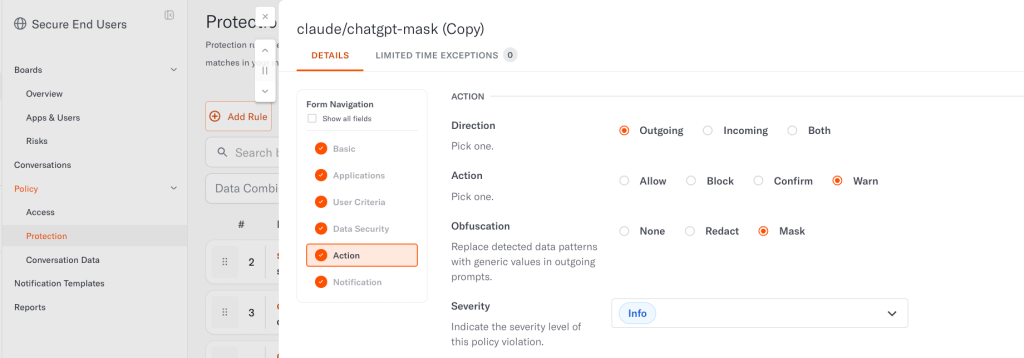
When an investigation requires the original information, administrators can unmask the value in the Conversations view, depending on their user role permissions. This gives them access to the detail they need for review while keeping the sensitive value out of the request sent to the model.
More precise policy for model access
Approving a platform can leave a further decision about which models teams may use within it. Amazon Bedrock, for example, lets teams build and run AI agents using a variety of models. An organization can allow Bedrock while blocking DeepSeek within it. The platform remains available, with policy applied to the model the organization has chosen to restrict.
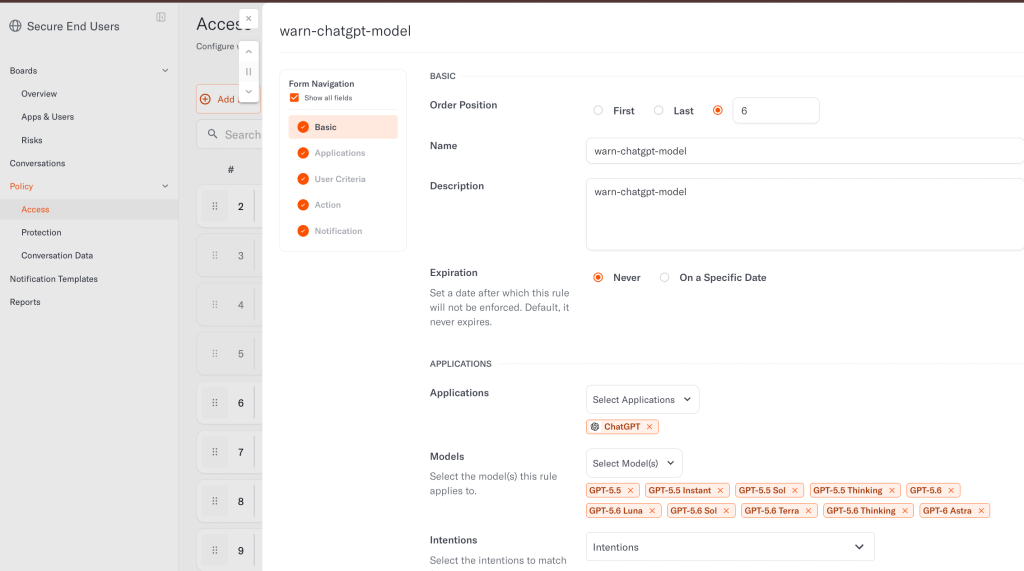
Aurascape already supports model-level policy. September deepens that coverage with more granular model-level controls for Claude, the Anthropic API, ChatGPT, the OpenAI API, Google Vertex AI API, and Amazon Bedrock. Access policies can coach users with warning or confirmation notifications, or block activity when they use a model restricted by the organization. Security teams can apply model-specific requirements across these services without treating approval of the application as approval of every model available inside it.
Build a clearer record for investigations
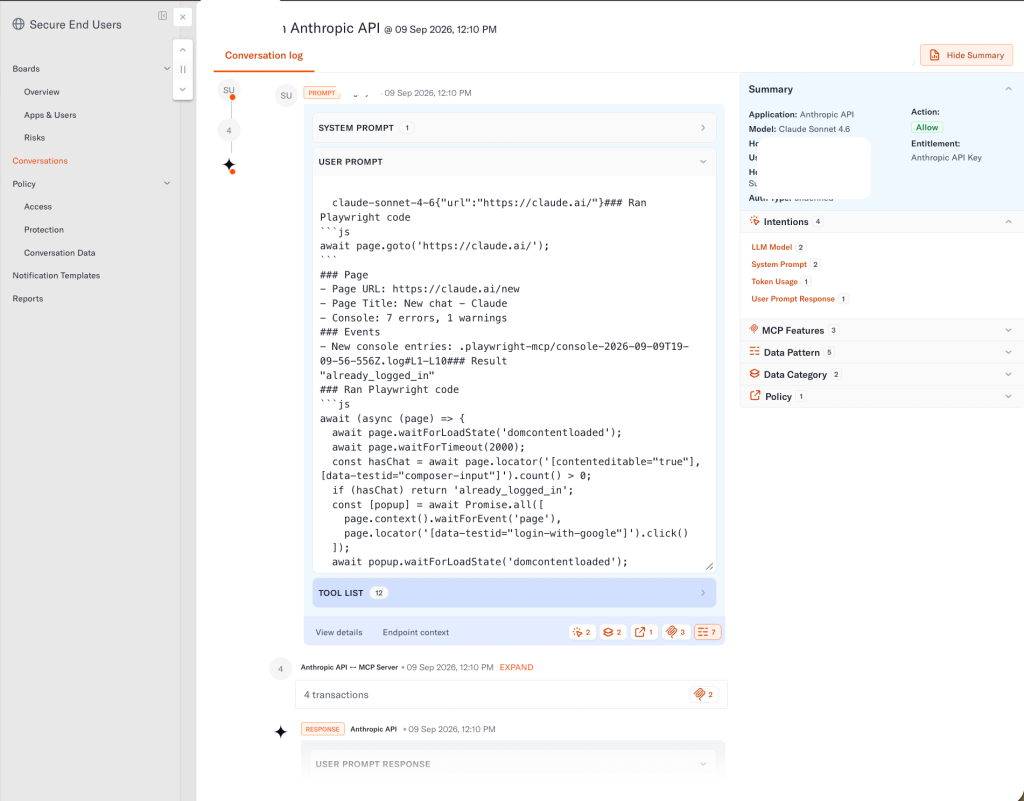
In a coding assistant session, the user prompt is what the developer types. The system prompt contains instructions supplied by the software running on the local machine, such as the coding assistant or agent. That software is the client. Distinguishing its instructions from the developer’s request helps a reviewer understand how the request was put together.
Conversation records for coding sessions now separate the system prompt, user prompt, and endpoint details into individual fields. The records also show more response content from interactions that use Model Context Protocol (MCP). For traffic monitored by the Zero-Bypass MCP Gateway, process name details help analysts attribute an interaction to the specific local application or agent behind it. Together, these records give reviewers a clearer account of what was sent, what came back, and which process initiated the interaction
September also adds administrator SSO activity to Audit Logs. Successful and failed login attempts are recorded with their timestamp, status, and source IP address, giving teams a record of attempts to access the Aurascape console.
Understand how widely AI tools are used
Conversation volume shows how much an AI application is being used. The number of distinct users shows how widely it has been adopted. Having both measures together helps security teams explain the scale of adoption as well as the amount of activity an application generates.
The on-demand reports customers can generate in the Aurascape console now include Unique User Counts by Application, showing how many distinct users were active on each application during the reporting period. Reports also add a Top Protection Policy Hits bar chart alongside the existing application breakdown, providing more context about the policies being triggered.
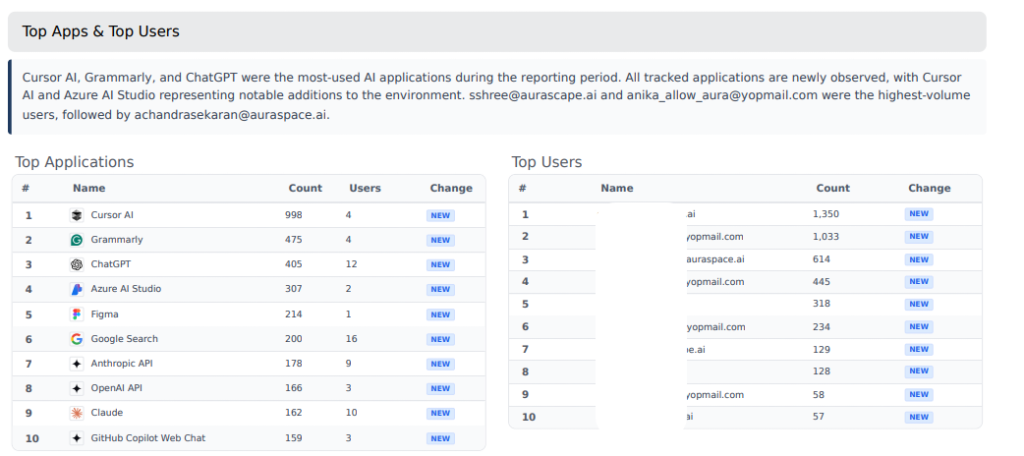
Customers can generate a single report whenever they need to show adoption levels, conversation volume, and protection policy activity. Teams can focus on user counts to understand an application’s reach, conversation counts to assess its volume of use, or both to give a fuller account of how it is being adopted.
Make routine administration more manageable
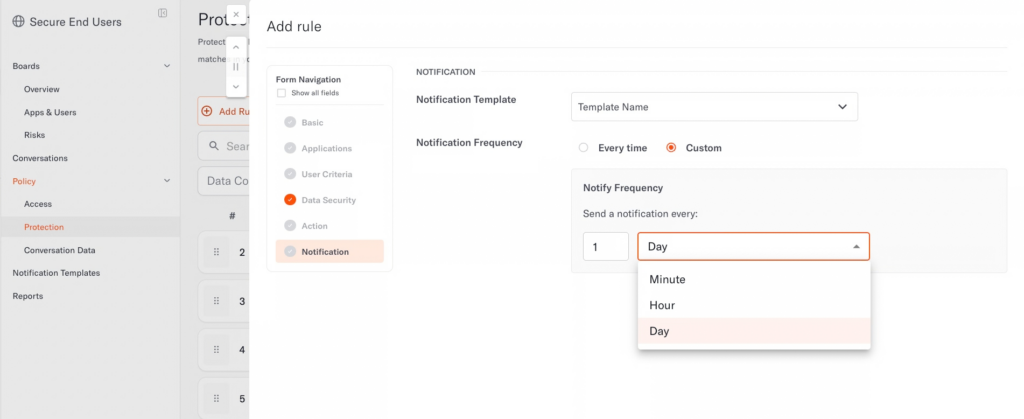
We’ve added more options for administrators to customize how often users receive real-time coaching notifications when they repeatedly trigger the same Protection policy. Teams can choose how their users receive coaching messages to help limit alert fatigue while continuing to guide users toward safer choices.
For teams maintaining data classification configurations, new APIs automate the management of data patterns, data categories, and data combination lists. They can also retrieve the supporting objects those configurations reference. Teams that keep classification logic in version control or synchronize it from another system can use these APIs to manage the corresponding Aurascape configurations as part of that work.
Putting the updates to work
We want security teams to have a sound basis for supporting useful AI work. Sometimes that means protecting a particular value or restricting a model. Sometimes it means having enough context to understand an interaction before deciding what to do next. This release gives teams more ways to make those decisions with care.
To explore how these capabilities fit the AI tools and policies in your organization, book a demo.
Aurascape Solutions
- Discover and monitor AI Get a clear picture of all AI activity.
- Safeguard AI use Secure data and compliancy in AI usage.
- Secure Agentic AI Secure how your teams use AI and build AI agents.
- Copilot readiness Prepare for and monitor AI Copilot use.
- Coding assistant guardrails Accelerate development, safely.
- Frictionless AI security Keep users and admins moving.
- AI Governance & Compliance Move from AI policy to enforceable governance.