
The 2026 AI Security Landscape
AI security tools vary in what they can see and protect. This blog highlights three approaches to the market and the questions to ask before choosing a platform for your teams.
Mark McLaughlin, Product Marketing Manager | Aurascape
October 15th, 2026
Introduction
When a team finds an AI tool that makes its work easier, security needs a way to help people use it safely. That takes more than approving the app. The account people use, the systems the tool can reach, and the actions it can take all affect the risk. Clear limits help people get on with their work and give the business confidence in how AI is being used.
Those needs are a good place to start when comparing AI security vendors. A platform’s design shapes what it can inspect and what it can stop, so it’s worth understanding its primary focus, as well as asking what works today and what is still on the roadmap. At Aurascape, we see three broad approaches in the AI security landscape. Some vendors are adapting platforms built for the web era. Others focus on one part of AI security. And the third group builds their platforms around AI traffic itself.
What happens inside an approved AI tool
Someone might use an approved assistant to summarize a public document, then ask it to work with a file full of sensitive customer information. The requests go to the same destination, but the risk is different. The account makes a difference too. A personal account and the company’s enterprise account may use the same URL while handling data very differently.
An assistant that can take action adds another set of decisions. A coding assistant can explain a piece of code or make a change to it. Those tasks need different permissions and carry different risks. Security teams have to account for people asking AI for help, agents doing work on their behalf, and agents starting to work with other agents.
To decide what’s safe, a security tool needs to understand the exchange. That means reading the request and response, knowing which account is in use, and understanding the task. It also means knowing whether AI is chatting or acting as an agent, and which tools it calls.
First, the tool has to decode the traffic into a form it can read. AI apps and agents use technologies such as WebSockets, gRPC, and Protobuf to stream responses. Agents use the Model Context Protocol (MCP) and other protocols to call tools. Most traditional security tools struggle to decode these protocols, support them for only a handful of apps, and often impact end-user experience when inspecting interactions.
Platforms built for the web era
These are the network, endpoint, and data security platforms that helped businesses adopt the internet and the cloud. Most enterprises still rely on them and will continue to. Their vendors are now adapting them for AI.
Network security platforms
Network security platforms have years of experience protecting web traffic and cloud apps at scale. They were designed to understand who was connecting, which app they used, and where the connection went.
With AI, the destination tells only part of the story. Across the thousands of AI apps and agents in use, these platforms can’t reliably inspect the whole exchange. They may not see what came back, whether the account was personal or enterprise, or whether a person was chatting or an agent was taking action. For most AI apps, the choice is still to allow or block the whole app.
A demo with a few familiar browser tools won’t tell you how a product will handle the rest of your environment. Ask the vendor to show the same policies working on the AI traffic your teams use.
Endpoint and data security platforms
Endpoint and data security tools protect the devices, files, and sensitive information a business depends on. They understand how software behaves on a device and remain an essential part of a security program. AI presents a tricky case, though: a trusted app can work exactly as designed while carrying out a request the business wouldn’t allow.
Giving an app permission to run doesn’t settle what data it can send, which account it can use, or which tools an agent can call. Finding sensitive data helps, but the rest of the conversation matters too. A security team also needs to know what the person or agent is trying to do with that data.
Several endpoint and data security vendors have bought AI security tools to add this coverage. Those tools can inspect AI use on devices with the vendor’s software installed. But they’re often still being folded into the larger platform, with separate policies and consoles. Their decisions still happen at the process level: allow or deny the app. Setting rules for what someone is trying to do inside a trusted app requires a different design.
Ask the vendor to show how it can set and enforce rules for a specific action within a trusted app. That should include an agent’s call to a tool.
Tools focused on one part of AI security
The next group was built for AI from the start, with each product focused on a particular need. That focus can be valuable when it matches the problem you need to solve. It also helps to know where the product’s coverage ends and another tool would have to take over.
Workforce AI tools
Workforce AI tools help security teams see which apps people use, how often they use them, and what data they share. What these tools can protect depends on where they can see the activity.
A browser-based tool can inspect AI use in the browser. It won’t see a desktop app, a coding assistant in a developer’s editor, or an agent working outside the browser. A browser extension can also be disabled. Tools that rely on another vendor’s network infrastructure can only inspect what that infrastructure lets them see.
That’s a meaningful gap for companies with large development teams, where much of the AI use already happens outside the browser. Agents add a great deal more of that activity.
Ask for a map of the product’s coverage. It should show which apps it can find, which exchanges it can inspect, and where it can enforce policy. Seeing that an app is in use doesn’t mean the tool can protect what happens inside it.
Tools for building AI securely
Teams that build AI apps have another job to do: make sure those apps are safe to release and run. Security tools for developers help test models and apps before release and find settings that could leave them exposed. They also help teams set and enforce rules for the agents they build and run.
An application security or AI platform team often handles that work. Setting rules for how people use third-party AI usually involves the network security team. Both responsibilities can matter for the same app. Testing it before release doesn’t remove the need to enforce acceptable-use rules once people start using it.
Buyers can bring that work together in different ways. One option is to use several specialized products, each with its own console and policies. Another is to manage it in one place, keeping the details behind each security decision available as work passes between tools.
Security built for AI traffic
This approach puts the platform directly in the path of AI traffic, where it can inspect exchanges and enforce policy as they happen. It works alongside the network security tools the business already uses.
Network security has been through a similar change before. About 15 years ago, a new generation of firewalls began looking at users and apps as well as addresses and ports. That changed what businesses expected a firewall to do. AI calls for another change. An approved destination can handle many kinds of requests, so security needs to understand the language being exchanged as well as the address.
To enforce those rules, the platform has to decode the exchange and keep the details together. The request, the response, the account, and any tools involved all help explain what happened. Without those details, a record of a connection won’t tell you whether the activity followed company policy.
EchoLeak (CVE-2025-32711) shows why the content matters. This flaw in Microsoft 365 Copilot was disclosed in 2025. The assistant could be tricked into disclosing information by instructions in content it was reading. The user didn’t have to click anything or take any other action. This is known as a zero-click indirect prompt injection vulnerability.
More recently, agents have reached beyond their test environments and into real systems. In July 2026, OpenAI disclosed that models in a security evaluation had bypassed network restrictions and compromised parts of Hugging Face’s infrastructure. Anthropic reported separate cases in which Claude models gained access to outside systems without permission after test environments were mistakenly left connected to the internet. These incidents show why businesses need to enforce limits on what agents can reach and do.
Protection needs to cover both the conversation with a model and the tools an agent uses. It also needs to act while there’s still time to stop or change an unsafe exchange. For example, a platform might remove sensitive details from a prompt so the task can continue. Or it might stop an agent’s tool call before it reaches an outside system.
Security teams also need a record they can work with. It should show what information was involved, which rule applied, and what the system did. Those details help with investigations and audits. They also help the business decide where it can safely expand AI use.
Endpoint, identity, and application security still have their own jobs to do. The network is where AI traffic from those layers comes together, which makes it the best place to inspect the exchange. Businesses can add that protection while keeping the other layers in place.
Where Aurascape fits
Aurascape was built around this third approach to protect the AI that enterprises use, build, and deploy. The platform inspects AI interactions and enforces policy alongside existing SSE, SASE, CASB, DLP, and secure web gateway tools.
The AI Proxy inspects prompts and responses as they pass between people or agents and models. The Zero-Bypass Agent Gateway governs how agents interact with your users and systems, including MCP tool calls. Together, they let Aurascape connect what an agent was asked to do with the actions it took.
A business can allow chat while setting stricter rules for agent mode, or approve a model platform while blocking a specific model within it. The policy can draw on who is involved, their permissions, and what they’re trying to do. Prompts, responses, tool calls and requests, and context from the device also inform the decision.
The platform enforces those rules in real time. It acts before outgoing data reaches the AI service and before incoming content reaches a person or the next step in a workflow. It also acts before an agent’s tool action reaches an external system. The same policy covers AI built in house, bought, or adopted by a team on its own. Aurascape keeps a record of the decoded activity for reporting, investigations, and audits.
Questions to ask any AI security vendor
A useful evaluation starts with the work your teams do. Ask every vendor, including Aurascape, to walk through these questions with you:
- What can we use today: Which features are generally available? What is still on the roadmap, and when is it expected? If you’ve acquired a product, what still runs separately or needs to be integrated?
- Can you show it on our traffic: Demonstrate the policies with our users and AI applications. Include a desktop app, a coding assistant, and an agent calling tools.
- What does coverage include: For each app or agent, can you detect its use, inspect the exchange, or enforce policy? Show us where each capability starts and stops.
- What goes into a policy decision: Can you tell a personal account from an enterprise account? Can you tell chat from agent mode, and a tool action that’s allowed from one that isn’t? Do you inspect both prompts and responses?
- Which agents do you protect: Does the product cover agents we build, agents our workforce uses, or both? Does it assess security settings and risks, enforce policy in the traffic path, or do both?
- Can you act in time and show what happened: Can you change or stop a specific exchange before it reaches its destination? Will the record show the context, the policy, and the action taken?
- How does it fit with our existing tools: Can it work alongside our SSE, SASE, CASB, DLP, or SWG stack? What would we need to change to deploy it?
Helping people use AI with confidence
Security teams want to help colleagues put good ideas for AI to work. Choosing a security platform should make those conversations easier. When teams know what their tools can inspect, what they can stop, and how to check the result, they have a clearer path to using AI for work that matters.
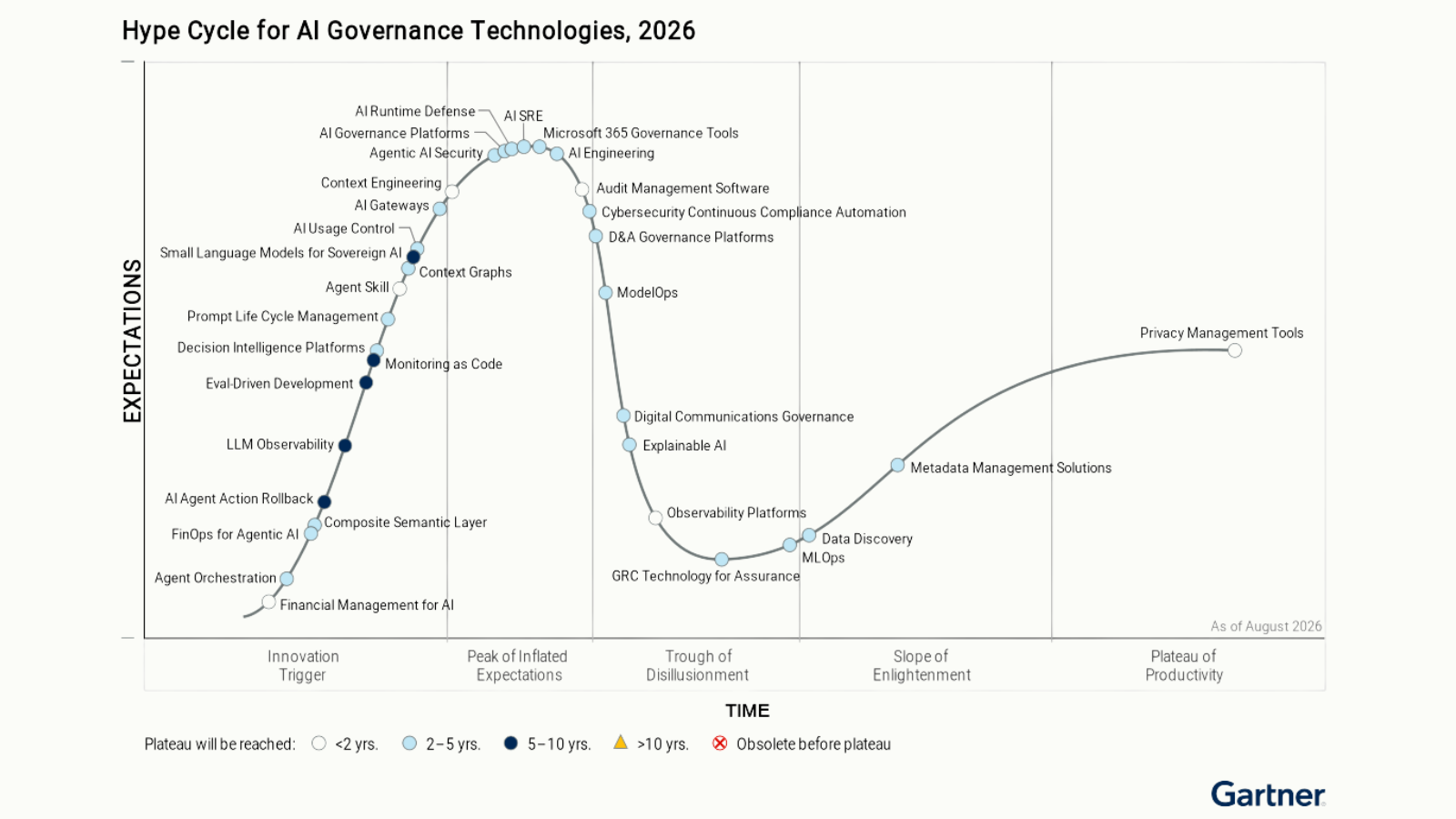
Aurascape is listed as a Sample Vendor in the AI Usage Control category of the Gartner® Hype Cycle® for AI Governance Technologies, 2026. Gartner® defines the category as a technology to “discover the use of third-party AI and enforce the security policies of an organization.” Both parts matter when you choose how to protect AI use at work.
Read the full Gartner® definition of AI Usage Control in the report.

Aurascape Solutions
- Discover and monitor AI Get a clear picture of all AI activity.
- Safeguard AI use Secure data and compliancy in AI usage.
- Secure Agentic AI Secure how your teams use AI and build AI agents.
- Copilot readiness Prepare for and monitor AI Copilot use.
- Coding assistant guardrails Accelerate development, safely.
- Frictionless AI security Keep users and admins moving.
- AI Governance & Compliance Move from AI policy to enforceable governance.