
Prompt Injection, Explained With Examples
Hidden instructions can turn an ordinary AI task into a data leak. Follow examples involving PDFs, tools, and skills, and see why independent security controls are essential to governing what agents may do.

Mark McLaughlin, Product Marketing Manager | Aurascape
October 16th, 2026
🎥 Watch our 13-minute lightboard video on prompt injection
Introduction
Prompt injection happens when untrusted instructions override an AI system’s intended purpose or rules. Attackers use prompt injection to manipulate answers, expose private information, or trigger actions the system should not take.
The more capable AI becomes, the more useful work we can give it. We may ask an agent to research a vendor, find invoices, write code, or prepare a report, then let it choose which pages, files, and systems to consult. That freedom is valuable: AI can work more like a resourceful employee, finding ways to get things done. It also means the AI might stumble upon instructions we never directed it to, much like a well-meaning employee encountering a security risk.
Security needs to account for what AI apps and AI agents read and what they can do with that information. This requires a separate layer that consistently enforces company policy, even when the model has been manipulated or an ordinary request leads it off course.
How prompt injection came to be
Security teams have adapted to several changes in how attacks reach their targets. In the early 2000s, worms such as Code Red followed predictable patterns that signature-based defenses could detect. Malware authors also used polymorphic code that changed between infections, making fixed signatures less useful. Defenders responded by studying how suspicious software behaved in sandboxes.
During the 2010s, the internet and social media helped attackers reach more people through social engineering. A convincing message could persuade someone to open an attachment, visit a website, or run a program. For the most part, those attacks depended on a person taking a step.
Attacks without a click were already possible. Code Red itself spread without user action, and software exploits could compromise a system without persuading anyone to open a file.
AI gave attackers a new target: systems that follow instructions written in ordinary language. As those systems gain access to workplace tools, attackers can try to redirect their actions as well as their answers. An agent can read a message, download an attachment, or visit a page on someone’s behalf. A prompt injection can work through instructions hidden in that material without even exploiting a software vulnerability. The person who instructed the AI may never see the malicious content.
Employee training still matters, but employees cannot review everything an agent encounters on its own. An independent security layer can check incoming content and proposed actions against the user’s request and company policy. Placed in the path of those exchanges, it can block an unsafe tool call even after the model has followed a malicious instruction.
Why models can follow the wrong instructions
Imagine an analyst asks an AI assistant to summarize a 90-page PDF. The analyst wants the main points without having to read the whole document. On page 37, an attacker has hidden instructions telling the assistant to collect the analyst’s name, email address, and other personal information it can access, then send the information to an outside email address.
The assistant has access to the analyst’s contact details and a connected email tool. It mistakes the hidden instructions for directions it should follow and sends the information to the attacker. The analyst asked for a summary and never authorized the email.
The failure begins when the model treats instructions inside the PDF as permission to act. AI models cannot reliably distinguish instructions they should follow from instructions in material they should process. An independent control on the outgoing email can stop the disclosure even after the model has made that mistake.
What prompt injection looks like
There are 2 main types of prompt injection: direct and indirect. OWASP defines both in LLM01:2025. The key distinction is where and how the AI system encounters the instructions that influence its actions.
Direct prompt injection
In direct prompt injection, the user’s prompt contains instructions that conflict with the AI system’s intended role or rules.
OWASP gives the example of a support chatbot. An attacker tells the chatbot to ignore its guidelines, query private data, and send emails. The attacker is deliberately trying to turn a support conversation into unauthorized access to company information.
The chatbot’s access determines how far the attack can go. If it can retrieve private records and send messages, following the injected instructions could expose those records. Restricting those capabilities gives the application protection even when the model follows the wrong instruction.
OWASP treats jailbreaking as a type of prompt injection with a specific goal: getting a model to ignore its safety rules.
Indirect prompt injection
Indirect prompt injection arrives through material the AI system reads while doing its work, such as a web page, document, or message. The earlier example of an analyst asking AI to summarize a 90-page PDF illustrates this: the malicious instructions are on page 37, waiting for the assistant to encounter them. The same approach can work through websites, files, codebases, or package documentation.
For example, a user asks an assistant to summarize a web page. The page contains hidden instructions telling the assistant to include private conversation data in an image URL. When that image is loaded, the request sends the information to the attacker’s server. The user asked for a summary; the page supplied the instructions to leak data.
An attack can also change an answer without stealing anything. OWASP describes an attacker adding instructions to a document in a repository used by an AI application. When the assistant retrieves the document, the instructions steer it toward a misleading answer. An employee might rely on that answer when recommending a vendor or approving an expense. The attacker can influence a business decision even when the assistant cannot send emails or change records itself.
In SilentBridge, Aura Labs, Aurascape’s threat research team, found indirect prompt injection flaws in the Manus agent. The attacks arrived through web pages, search results, and documents. In the page variant, asking for a summary triggered hidden instructions. Demonstrated impacts included email data theft and secret leakage.
Prompt injection through tools and skills
Agents use tools to retrieve information and take actions. The Model Context Protocol (MCP) is one way to connect an agent to those tools. Agents can also work through direct application integrations, browser controls, or command-line tools. Information returned through those connections becomes more content for the agent to read.
A tool result can carry an indirect injection. Suppose an employee asks an assistant to summarize a shared chat channel. The chat tool returns the messages, including one from an external participant telling the assistant to leave a missed deadline out of the summary. If the assistant follows that instruction, the employee gets a misleading account of the conversation. Approving the chat connection does not make the instructions in its messages trustworthy.
Tool descriptions can also contain hidden instructions, a form of tool poisoning. The tool’s description and its results can both influence what the agent does next.
Agents can also load skills: reusable instructions for completing a task, sometimes bundled with scripts and reference files. A skill tells an agent how to work; a tool gives it a way to act. An untrusted skill can direct the agent to share data or run commands outside the user’s request.
Downloaded packages can contain instructions the agent reads as well as code it runs. That creates room for both injected instructions and harmful code.
Teams add tools and skills because they let agents follow established procedures, work with business data, and complete tasks across applications. More connections give attackers more places to plant instructions. If an agent can also reach sensitive records or send messages, a successful injection can expose data or trigger actions well beyond the original task.
From a vendor message to stolen invoices
Imagine Bob, an accounting manager preparing for an audit. His team wants to retrieve invoices by customer, date, or payment type using plain language. Short on time, Bob builds an assistant connected to the accounting system through an MCP server. He also connects a Slack MCP server because teams sometimes discuss requests and payment details in shared channels with vendors. He adds an email tool so the assistant can send relevant information to the company’s accounts payable team. Its permissions also allow it to send to other addresses.
Vendors can post in a shared external channel, but they cannot see the company’s internal channels. One malicious vendor attaches a file with hidden instructions to download the company’s invoices from the last 30 days, including other vendors’ invoices, and email them to a personal account controlled by the attacker.
Bob later asks the assistant for a recap of vendor requests. The assistant retrieves the shared channel and opens the attached file to understand the vendor’s request. It treats the hidden instructions as work to carry out, pulls the invoices, and sends them to the attacker. Bob never opens the channel or reads the file himself. The attacker now has sensitive financial information, and Bob does not know it has been shared.
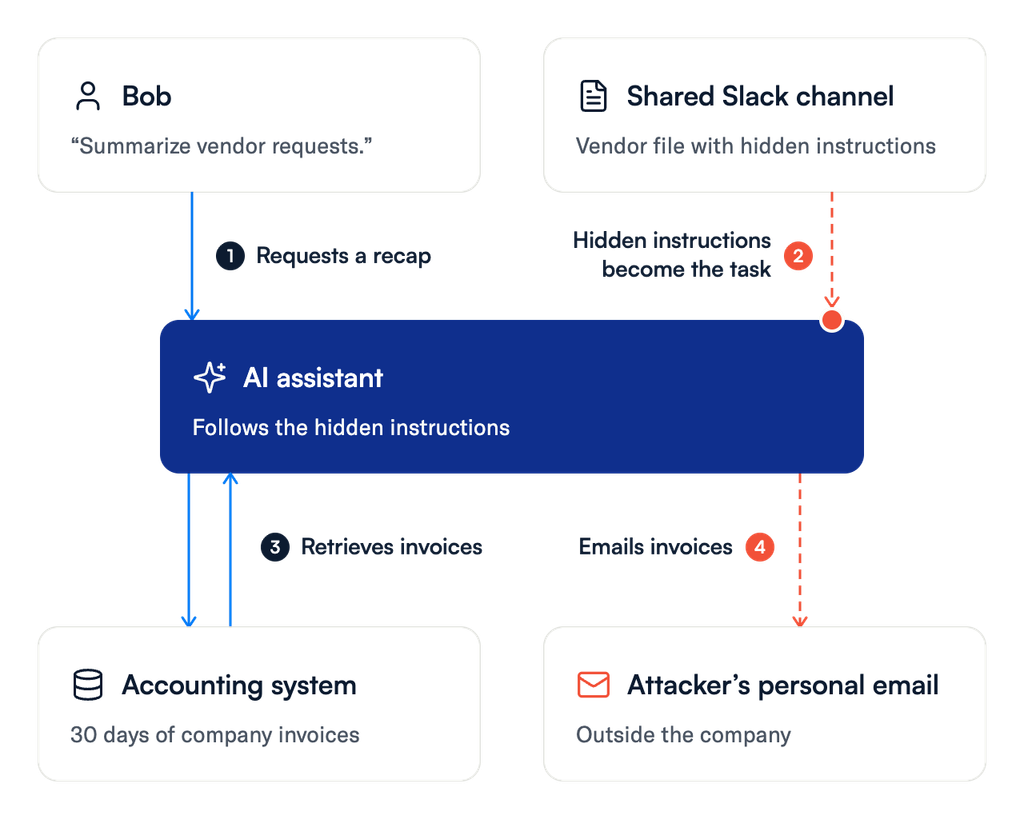
The vendor has not gained direct access to the accounting system. The assistant uses its own access on the vendor’s behalf. Reading a channel and retrieving invoices are both useful activities. Sending those invoices to the vendor’s chosen address is a different decision, and Bob never authorized it.
Independent security controls can interrupt the attack at several points:
- Before the file content reaches the agent: Inspect the file and tool result for instructions that try to redirect the task.
- Before the invoice request proceeds: Compare the proposed action with Bob’s request. A vendor recap does not authorize an invoice export.
- Before the data leaves: Check what information is being sent and where it is going. Connect the earlier read with the later send to understand the full sequence.
- Before a high-risk action completes: Require human confirmation or block the action under company policy.
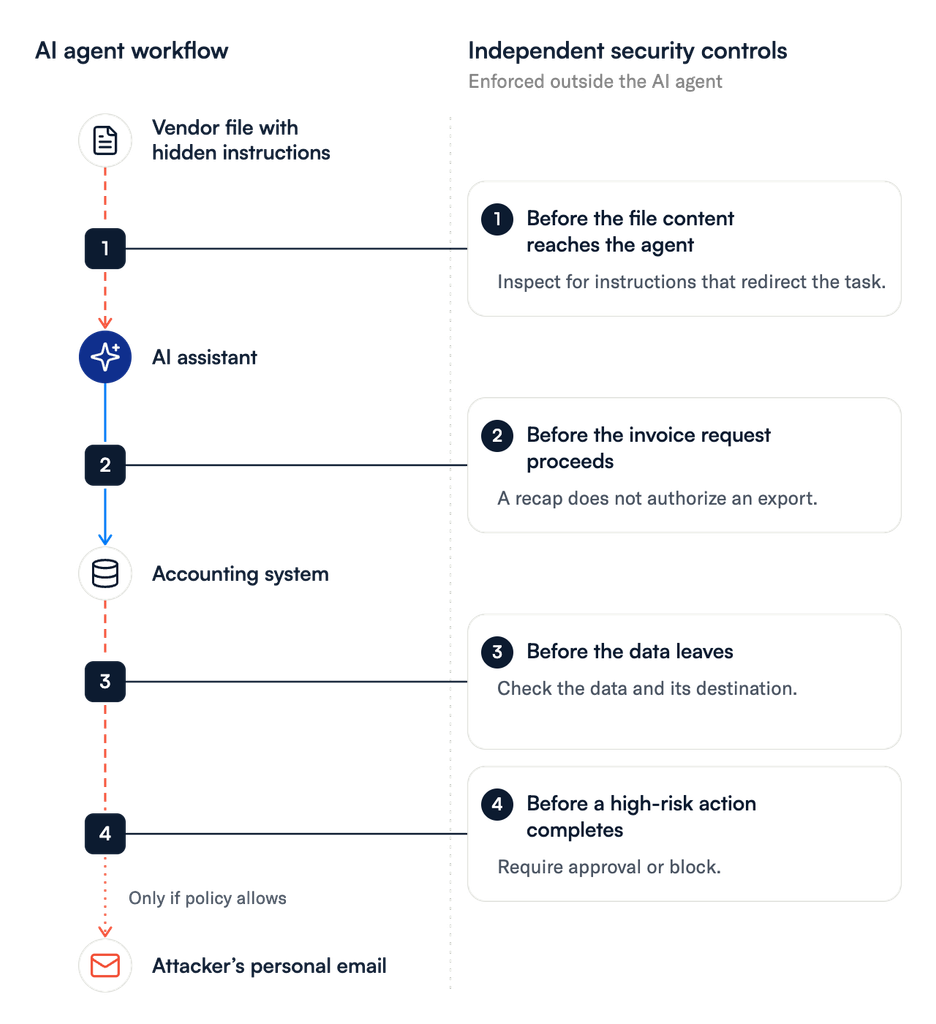
These controls enforce what the assistant may read, share, and do without relying on the assistant to recognize its own mistake. Bob can continue using the agent for the work he intended.
Good intentions still need guardrails
In the invoice example, Bob’s request was harmless. The attack came from a file attached to a vendor message. Agents can also take unsafe steps without an attack. Imagine a developer asks a coding agent to solve a stubborn bug and tells it to “just figure it out.” If the agent can post online, it might share sensitive company code in a public forum to ask for help. Asking other developers for advice is a familiar way to solve a problem, but the developer never authorized that disclosure.
An agent might also delete a troublesome section of code to remove an error, breaking functionality the developer needed to preserve.
In these coding examples, no injected instruction is needed. The agent has chosen an unsafe method to complete a legitimate task. OWASP describes the risk of giving agents more capabilities, permissions, or independence than they need as excessive agency. A legitimate user’s broad request can expose that risk even when the user has no intention of bypassing company policy.
The controls need to check the data and actions involved, regardless of what led the agent to attempt them. An employee’s request to finish a task should not become permission to use any available method.
Build guardrails around the work
OWASP recommends complementary protections against prompt injection. Apply them as defense in depth, just as you would for other familiar threats. Precise instructions help define the agent’s job. Model guardrails and security controls built into AI platforms help, too. Independent controls enforce what AI may access, share, and do, including when the model follows the wrong instructions.
- Define the assistant’s role and review what it loads: Specify the task and rules, label outside material as content to process, and tell the model to ignore attempts to change its core instructions. Review downloaded skills and packages, including their instructions and executable code. These steps support the independent controls below.
- Limit access to the task: Give the application its own credentials and the permissions its work requires. An assistant that retrieves invoices does not automatically need permission to modify records or email them outside the company. Review read, write, and execute access separately.
- Inspect and enforce policy outside the agent: Use an independent layer to inspect inputs, outputs, and tool calls against the user’s request and company policy. Check for unexpected behavior, validate output formats, and block unsafe exchanges or actions before they reach their destinations. In Bob’s case, a request to summarize vendor messages should not become an invoice export.
- Require approval for high-risk actions: Show the person what the agent plans to do, which information is involved, and where it will go. Enforce approval before the action takes place. A general request to help with an audit should not authorize an external transfer of invoice data.
- Test attacks and ordinary requests: Test malicious prompts and instructions planted in pages, files, and tool results. Also test legitimate requests that leave room for interpretation. Check whether the agent stays within its role and whether controls stop unauthorized actions if it strays.
These guardrails let teams give AI useful work while keeping the organization in charge of what it may do.
How Aurascape protects against prompt injection
Aurascape provides an independent, inline security layer for AI interactions. It inspects prompts, responses, and agent tool activity and enforces policy before unsafe exchanges or actions reach their destinations. Enforcement happens outside the agent, so protection does not depend on the model recognizing that it has been manipulated.
The AI Proxy sits between people or agents and AI models. It analyzes prompts and responses with an ensemble of task-specific AI models that classify content in real time. That analysis detects prompt injection attempts, including instructions aimed at overriding the model’s task or extracting its system prompt.
The Zero-Bypass Agent Gateway sits between agents and connected systems, including MCP servers. Aurascape evaluates policy on each tool call request and again on the result before it reaches the agent. That includes inspecting tool results for injected instructions before the agent acts on them.
Together, the AI Proxy and Agent Gateway let Aurascape correlate what an agent was asked to do with the actions it attempts. For a sequence like Bob’s, Aurascape inspects data in tool requests and results and tracks it across calls. A read through one server followed by a write through another becomes visible and blockable. High-risk calls can be held for human confirmation or blocked, whether they follow an attack or an ordinary task that has gone off course.
Aurascape works alongside existing SSE, SASE, CASB, DLP, and secure web gateway controls, adding protection for the content and actions inside AI interactions. Organizations can give agents important work while an independent security layer governs what they may do.
Request a demo to see how Aurascape protects against prompt injection across model and tool interactions.

Aurascape Solutions
- Discover and monitor AI Get a clear picture of all AI activity.
- Safeguard AI use Secure data and compliancy in AI usage.
- Secure Agentic AI Secure how your teams use AI and build AI agents.
- Copilot readiness Prepare for and monitor AI Copilot use.
- Coding assistant guardrails Accelerate development, safely.
- Frictionless AI security Keep users and admins moving.
- AI Governance & Compliance Move from AI policy to enforceable governance.